Showing posts with label library programming. Show all posts

Thursday, November 29, 2007

NIH Toolkit for Teaching Older Adults How to Search for Health Information

Carol Bean recently wrote a post about the new National Institute of Health (NIH) toolkit for people who want to teach older adults how to search for health information online. This toolkit is located on this page of the NIHSeniorHealth website.

This toolkit has several different levels of lesson plans:

  • For beginning students with little computer experience: internet basics
  • For beginning students with some Internet experience: 3 modules about NIHSeniorHealth
  • For beginning and intermediate students:a module about NIHSeniorHealth and Exercise for Older Adults
  • For intermediate students - three modules about MedlinePlus
  • For all students: Evaluating Health Websites and a glossary of computer terms
There is also a pdf with their recommended quick tips for teaching computers to older adults.

Carol Bean evaluated the "Quick tips" pdf in her blog post and recommended it as useful for technology trainers. However, she did mention that she disagrees with a few of the suggestions in this pdf. For example, she wrote that "The first is the suggestion to keep class length to around 90 minutes or less. My rule of thumb, from experience, is 60 minutes or less. to keep class length to around 90 minutes or less."

I completely agree with Carol on this point. If you try to go on too long during a class, it will be a draining experience for people, rather than a pleasant learning experience. Another potential problem is trying to pack too much information into one class period.

I looked at the module for the beginning students with little computer experience. I am afraid that they packed way too much information into one class - everything from computer terms, to how to use a mouse, how to open a browser, to how to navigate through webpages. I think that this would definitely frighten people away from taking any more computer classes. It would be too intimidating. There is no time for a student to practice using a mouse or time to comprehend the new terminology.

My suggestion would be to separate this information into several classes to allow older adults to become comfortable with computers, to use a mouse, and to work with browser software. After people have mastered these skills, then introduce them to the specific modules about NIHSeniorHealth, MedlinePlus, and the excellent module on evaluating health websites. These modules are very useful for introducing older adults to searching for health information online. I think that this would be the best way to introduce "health information search" classes to older adults in a public library.

Overall, I think that we need to avoid the trap of trying to teach too much in one sitting. Since we as librarians have been using computers and the internet for many years, we tend to forget that it takes time for new computer users to internalize this knowledge and to practice computer skills.

AddThis Social Bookmark Button

Friday, November 23, 2007

Successful Wii Gaming Program at Old Bridge Public Library

The Old Bridge Public Library has started a program in which teens teach older adults games such as Wii Bowling , Brain Age Academy, and Guitar Hero. The Wii games will also be available so that seniors can practice several times a week. The library is planning to have a gaming competition event in December.

This is the next phase of the “Senior Spaces” project, which began with the renovation of part of the Old Bridge Public Library to appeal to older adults. “Senior Spaces” project manager, Allan Kleiman, reported that "The reaction from the seniors was fantastic," and "One of the seniors was almost in tears. She hasn't been able to bowl in years due to a visual impairment and every time she bowled a strike you could hear her yell throughout the room."

For more information about the “Senior Spaces” project, please check out their website. The photo above is courtesy of Allan Kleiman of the Old Bridge Public Library.

Note: Allan Kleiman just sent out a message to the Senior Services ALA listserv with a link to a recent newspaper article about this program.

AddThis Social Bookmark Button

Thursday, September 06, 2007

National Grandparents Day

National Grandparents Day is the first Sunday after Labor Day, which is September 9th this year. President Jimmy Carter added this celebration in 1978. Marion H. McQuade first championed the idea for this celebration and her descendents created a nonprofit organization, the National Grandparents Day Council. The organization website states:

"Our goals are to honor grandparents and to strengthen
the bond between grandparents and grandchildren.
Additionally, we strive to draw compassionate attention
to the eldest of society's elderly--those in nursing homes."
Their website lists many intergenerational activities. It is a good source for ideas for library programs celebrating Grandparents Day. The Legacy Project provides an even more extensive list of activities and planning resources in their Grandparents Day Activity Kit. This kit includes scrapbook ideas, communication and storytelling ideas, keepsake crafts, and family history activities.

The National Grandparents Day Council sponsored a YouTube contest this summer for videos honoring grandparents. All the contest videos can be viewed here.

Here is the winning video:


I think that libraries should consider hosting a YouTube competition for children and teens with the theme of honoring their grandparents. This could supplement an essay or drawing contest held by libraries. The winners could be announced on Grandparent's Day, with prizes provided to the winners.


AddThis Social Bookmark Button

Tuesday, July 17, 2007

Tips for Older Adult Computer Classes


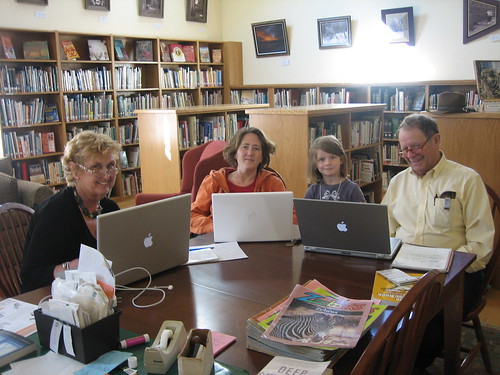
Jessamyn West, a rural librarian, recently posted a video showing her teaching a computer class to older adults at the Tunbridge Public Library.


Here is a picture of her class that she posted on Flickr
---->


She also posted suggestions for librarians who are trying to decrease the digital divide in older adults. Here are some of her suggestions and my comments:

1) "Encourage people to get laptops." and
2) "Invest in wifi."
Jessamyn pointed out that people can then use the library's wi-fi to connect with the internet if they can not afford Broadband service at home. She mentioned that learning and practicing on the same computer is very helpful for people. I agree that wifi is definitely a selling point for libraries. In addition, since people can bring their computer to the library, it is easier for staff to answer any questions that the patron has about their computer. Librarians do not have the time or resources to go to patrons homes and fix their computer problems, but we can do simple troubleshooting for patrons, if they bring in their laptop.

3) "Solve Problems"
I wholeheartedly agree with Jessamyn that having an informal, open class for general tutoring and answering problems is very important. Formal classes are great for people who want to learn a particular skill, such as word processing. However, if a patron just wants the answer to one question, it is not convenient for them to wait through an entire computer class. This class also provides an avenue for patrons to ask questions not generally covered in the courses provided by the library.

4) "Larger groups"
Jessamyn recommends teaching classes with multiple students (2 or 3). Her reasoning is that older adult patrons will be less stressed if the teacher is not focussed solely on them and that having a more social atmosphere is more conducive to learning. I agree that many, though not all, older adults will feel more comfortable in small groups. However, if the group gets too large, then I feel that some patrons will not be able to get the personalized help that they need - which can also lead to stress.

I would like to add another suggestion about teaching computer skills to older adults. If my students seem to be following along and understanding everything well, I have a tendency to add too much information - which can lead to information overload. It is important to fight this tendency! Instead, it is much better to reinforce a few steps during the class and have people practice those steps many times, rather than to try to cover a lot of content.

Also, several of my students have told me that they feel much more comfortable and confident if they have a printed list of straightforward steps for a particular task, which they can keep and continue to refer to as needed. It can be overwhelming to new computer users to try to memorize all the steps to a task. If the teacher has been using a computer for many years, it is easy to forget how much there is to memorize and how foreign the computer terms and menus can be for a new user.

AddThis Social Bookmark Button

Monday, July 16, 2007

Console gaming for Older Adults - not just for teens

The GenBetween blog mentioned a Boston Globe article by Robbie Brown about Nintendo marketing their Wii gaming console to older adults. Nintendo donated their Wii system to over a dozen retirement communities throughout the country to stimulate interest in the gaming console. According to the article, "For seniors who can't play sports any more, the Wii approximates the motion of the games they once enjoyed. It requires players to swing a motion-detecting controller like a golf club, bowling ball, tennis racquet, or other piece of athletic equipment." In addition, Digital Trends blog announced that Nintendo has recently introduced a brain game for the Wii, called "Big Brain Academy: Wii degree", which is being marketed to all age groups. The New York Times reported that Nintendo has started to showcase its Wii games at AARP events such as Life@50+.

Recently, I have been seeing a lot of articles about older adult gaming. For example, a recent post from the Last100 blog quotes Nintendo as stating that in households which own a Wii, "... 3/4 of men 25-to-49 have tried the Wii and 1/3 play it regularly. Of men more than 50 years old, half have tried it and 1 in 8 play games daily. Ten percent of women over 50 report playing the Wii regularly."

Many libraries are adding video games and gaming tournaments to attract teenagers to the library (see the Game on: Games in Libraries blog). However, games can also be used for older adult programing in libraries and in outreach. A PLABlog post lists Wii gaming as one of the examples of creative programming for older adults discussed at the "Programming Not Just for Boomers" presentation at the ALA 2007 conference. Leslie Farrell, from the Library2.0 social network, also pointed out Jenny Levine's presentation on Gaming in the Library which mentions older adult gaming along with teen gaming.

If a library is going to invest in a gaming console, it makes sense to encourage participation by patrons of all ages. Gaming programming can be for the whole family. Have any of your libraries hosted gaming tournaments? If so, were any of the programs targeted to families or older adults? Have any of your libraries used gaming consoles, such as the Wii system, for outreach to senior centers or assisted living facilities?

Note: I posted a followup to this post "More Wii gaming for older adults".

AddThis Social Bookmark Button