Showing posts with label technology training. Show all posts

Thursday, November 29, 2007

NIH Toolkit for Teaching Older Adults How to Search for Health Information

Carol Bean recently wrote a post about the new National Institute of Health (NIH) toolkit for people who want to teach older adults how to search for health information online. This toolkit is located on this page of the NIHSeniorHealth website.

This toolkit has several different levels of lesson plans:

  • For beginning students with little computer experience: internet basics
  • For beginning students with some Internet experience: 3 modules about NIHSeniorHealth
  • For beginning and intermediate students:a module about NIHSeniorHealth and Exercise for Older Adults
  • For intermediate students - three modules about MedlinePlus
  • For all students: Evaluating Health Websites and a glossary of computer terms
There is also a pdf with their recommended quick tips for teaching computers to older adults.

Carol Bean evaluated the "Quick tips" pdf in her blog post and recommended it as useful for technology trainers. However, she did mention that she disagrees with a few of the suggestions in this pdf. For example, she wrote that "The first is the suggestion to keep class length to around 90 minutes or less. My rule of thumb, from experience, is 60 minutes or less. to keep class length to around 90 minutes or less."

I completely agree with Carol on this point. If you try to go on too long during a class, it will be a draining experience for people, rather than a pleasant learning experience. Another potential problem is trying to pack too much information into one class period.

I looked at the module for the beginning students with little computer experience. I am afraid that they packed way too much information into one class - everything from computer terms, to how to use a mouse, how to open a browser, to how to navigate through webpages. I think that this would definitely frighten people away from taking any more computer classes. It would be too intimidating. There is no time for a student to practice using a mouse or time to comprehend the new terminology.

My suggestion would be to separate this information into several classes to allow older adults to become comfortable with computers, to use a mouse, and to work with browser software. After people have mastered these skills, then introduce them to the specific modules about NIHSeniorHealth, MedlinePlus, and the excellent module on evaluating health websites. These modules are very useful for introducing older adults to searching for health information online. I think that this would be the best way to introduce "health information search" classes to older adults in a public library.

Overall, I think that we need to avoid the trap of trying to teach too much in one sitting. Since we as librarians have been using computers and the internet for many years, we tend to forget that it takes time for new computer users to internalize this knowledge and to practice computer skills.

AddThis Social Bookmark Button

Thursday, September 20, 2007

Empowerment, Self-confidence, and Decreased Loneliness - Additional Benefits of Technology Training for Older Adults

Many public libraries offer introductory computer classes to help “bridge the digital divide” – to train people to use computers and to give them access to the internet. This is important because many health resources, government resources and applications, and job applications are now only available online. This technology training and access to the internet enables people to get the information that they need. However, two recent articles in the Journal of Aging and Mental Health pointed out additional benefits of technology training for older adults:

Shapira, Barak, & Gal (2007) described a study in which a group of older adults from elderly day care centers and from nursing homes were taught to use computers and the internet. These older adults scored significantly higher than control groups in life satisfaction, depression, loneliness and self-control. Shapira et al. (2007) reported that “Computer and Internet use seems to contribute to older adults' well-being and sense of empowerment by affecting their interpersonal interactions, promoting their cognitive functioning and contributing to their experience of control and independence.”(p. 1360).

Fokkema and Knipscheer (2007) set up an in home intervention program where handicapped and chronically ill older adults were taught to use computers and the internet in their homes. Then, the participants were tested for loneliness. They showed a significant decrease in loneliness compared to the control group. These older adults used the internet to communicate with others via email and this increased their social contact. Fokkema and Knipscheer (2007) found that using the internet gave people something to think about other than their loneliness and it also increased their self confidence.

These studies show the impact that technology training can have for older adults. It would be great for libraries to partner with adult day care facilities and nursing homes to bring technology training to older adults who can not come to a library for computer classes.

References:
Fokkema, T. & Knipscheer, K. (2007). Escape loneliness by going digital: A quantitative and qualitative evaluation of a Dutch experiment in using ECT to overcome loneliness among older adults. Aging & Mental Health, 11 (5), 1360-7863. Retrieved September 20, 2007, from http://www.informaworld.com/10.1080/13607860701366129.

Shapira, N., Barak, A. & Gal, I. (2007). Promoting older adults’ well-being through Internet training and use. Aging & Mental Health, 11 (5), 1360-7863. Retrieved September 20, 2007, from http://www.informaworld.com/10.1080/13607860601086546.

AddThis Social Bookmark Button

Thursday, August 16, 2007

Netguides Program


Andrea Mercado introduced me to a great new service for older adults provided by the Reading Public Library of Reading, Massachusetts. Netguides matches students who have been trained by the library with patrons who want one-on-one computer tutorials. Topics include basic computing, introduction to the internet, email, online databases, and Microsoft office applications. Sessions are one hour, by appointment. This program is in addition to their regular computer classes.

This is wonderful for people who may lack confidence in learning how to use a computer. Participants can get their questions answered and get special attention, which they would not be able to get in a large computer class. The program uses student volunteers. This gives an intergenerational aspect to the program.

By organizing volunteers this way, one can provide this one-on-one help for patrons, even if you don't have a lot of staff time. For more specific information on how to implement this program, please see "Netguides lessons learned and class changes" by Andrea Mercado from her Library Techtonics blog.

If your library is planning to start such a program, I suggest that one consider recruiting technology savvy older adults to volunteer for such a program, in addition to the student volunteers. Some older adults may feel more comfortable with tutors who are in their own age group.

Note: Photo of Reading Public Library and Librarians via Myspace photos.

AddThis Social Bookmark Button

Thursday, July 26, 2007

Video of "Connecting the Disconnected"

Carol Bean recently posted links to her presentation at the American Library Association pre-conference workshop on Libraries, Older Adults and Technology. These video clips show the challenges which older adults face when learning new technology terms and how to use new technology. Her points include:

    • Old word associations make it harder for older adults to learn technology terms, such as icon, button, and menu.
    • Older adults may have more difficulty in maintaining concentration.
    • Visual problems and hearing difficulties are additional challenges.
We are so used to the technical terms and the user interface for computers, that it is often hard to remember what it was like to be a novice user. This presentation is especially helpful because it simulates the experiences of older adults, so that one can empathize with the challenges that they face. Then, we can take this information into account when teaching older adults.

AddThis Social Bookmark Button

Tuesday, July 17, 2007

Tips for Older Adult Computer Classes


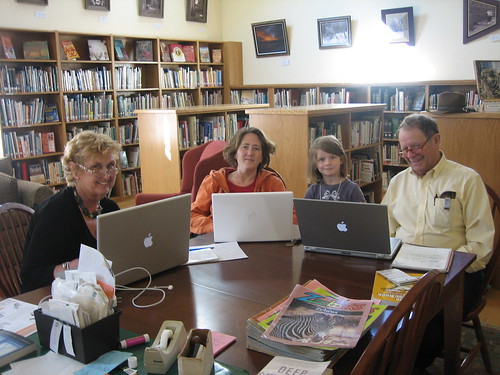
Jessamyn West, a rural librarian, recently posted a video showing her teaching a computer class to older adults at the Tunbridge Public Library.


Here is a picture of her class that she posted on Flickr
---->


She also posted suggestions for librarians who are trying to decrease the digital divide in older adults. Here are some of her suggestions and my comments:

1) "Encourage people to get laptops." and
2) "Invest in wifi."
Jessamyn pointed out that people can then use the library's wi-fi to connect with the internet if they can not afford Broadband service at home. She mentioned that learning and practicing on the same computer is very helpful for people. I agree that wifi is definitely a selling point for libraries. In addition, since people can bring their computer to the library, it is easier for staff to answer any questions that the patron has about their computer. Librarians do not have the time or resources to go to patrons homes and fix their computer problems, but we can do simple troubleshooting for patrons, if they bring in their laptop.

3) "Solve Problems"
I wholeheartedly agree with Jessamyn that having an informal, open class for general tutoring and answering problems is very important. Formal classes are great for people who want to learn a particular skill, such as word processing. However, if a patron just wants the answer to one question, it is not convenient for them to wait through an entire computer class. This class also provides an avenue for patrons to ask questions not generally covered in the courses provided by the library.

4) "Larger groups"
Jessamyn recommends teaching classes with multiple students (2 or 3). Her reasoning is that older adult patrons will be less stressed if the teacher is not focussed solely on them and that having a more social atmosphere is more conducive to learning. I agree that many, though not all, older adults will feel more comfortable in small groups. However, if the group gets too large, then I feel that some patrons will not be able to get the personalized help that they need - which can also lead to stress.

I would like to add another suggestion about teaching computer skills to older adults. If my students seem to be following along and understanding everything well, I have a tendency to add too much information - which can lead to information overload. It is important to fight this tendency! Instead, it is much better to reinforce a few steps during the class and have people practice those steps many times, rather than to try to cover a lot of content.

Also, several of my students have told me that they feel much more comfortable and confident if they have a printed list of straightforward steps for a particular task, which they can keep and continue to refer to as needed. It can be overwhelming to new computer users to try to memorize all the steps to a task. If the teacher has been using a computer for many years, it is easy to forget how much there is to memorize and how foreign the computer terms and menus can be for a new user.

AddThis Social Bookmark Button